LucaComing soon

Everything Luca does

One job, done kindly: tell you roughly what is on your plate, and make it quick to write down.

Luca the poodle smiling

Photo scan

A photo in, four numbers out

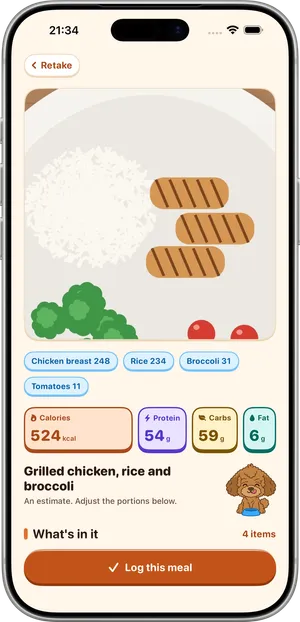
Fit your meal inside the square frame and take the photo. In seconds Luca returns a list of the foods it saw and an estimate of calories, protein, carbs and fat.

  • The camera gently tells you when no meal is in view. That check happens on your phone.
  • When Luca is unsure, it asks one quick question about the portion.
  • Every item and every number can be edited before you log.
  • Results are labelled as estimates, because they are.
  • A scan is one AI estimate from a photo, a spoken or a typed description.
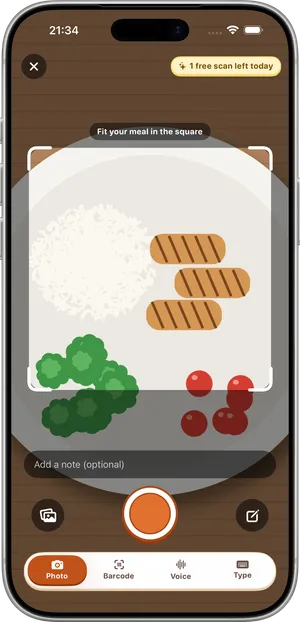
Luca's camera on iPhone: a drawn sample meal inside a square frame labelled Fit your meal in the square, with Photo, Barcode, Voice and Type below

Fix with words

Correct it by saying what is different

When the result is close but not right, type a sentence: "the rice was brown", "no butter", "it was two eggs". Luca updates the items and the numbers.

  • Up to 5 fixes per meal.
  • Fixes do not use a scan.
  • Or change any portion with the plus and minus buttons.
  • Luca learns your usual portions from your corrections. That stays on your phone.
A result in Luca on iPhone: four boxes for calories, protein, carbs and fat, the meal name, the line An estimate, adjust the portions below, and a Log this meal button

Voice and text

Say it or type it

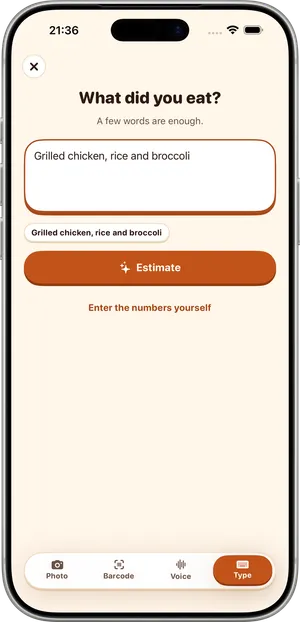
Hands full, or the plate is already empty? Describe the meal out loud or type a few words, and Luca turns it into the same editable item list.

  • By voice, Luca records up to 20 seconds and sends the audio to our server to be turned into text. The recording is not kept.
  • The more specific the description, the closer the estimate.
  • Each one counts as a scan, like a photo.
Typing a meal in Luca on iPhone: Grilled chicken, rice and broccoli in the What did you eat? field, above an Estimate button

Barcode and label

Packaged food, straight from the label

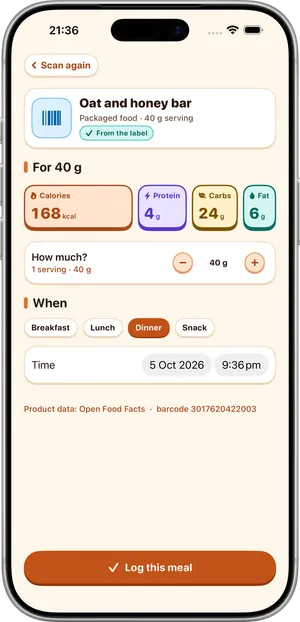
Scan the barcode on a packet and Luca looks the product up, so the numbers come from label data, not from a guess about a photo.

  • Unlimited on the free plan.
  • Barcode not found? Photograph the nutrition label and Luca reads it, or type the numbers in.
  • The label in your hand always wins.
A packaged product found by barcode in Luca on iPhone: Oat and honey bar, four nutrition boxes for a 40 g serving, a serving stepper and a line saying where the product data comes from

Recent and favorite meals

One tap for the usual

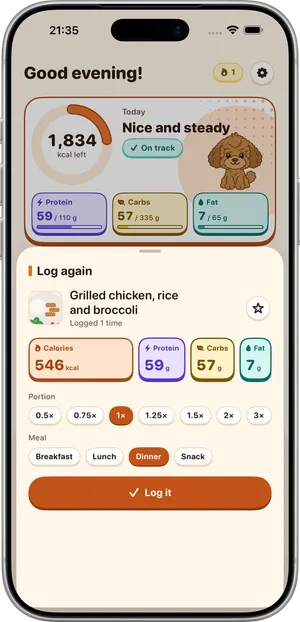
Most people eat the same handful of breakfasts and lunches. Recent meals and the ones you mark as favorites can be logged again with one tap.

  • No scan needed, so it does not use your daily scan.
  • Keeps the numbers you already corrected.
  • Change the portion as you log it.
Log again in Luca on iPhone: a saved meal with its four numbers, portion choices from half to triple and a Log it button

Daily ring and targets

See the day at a glance

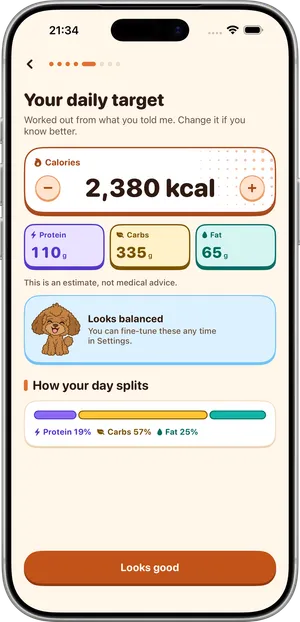
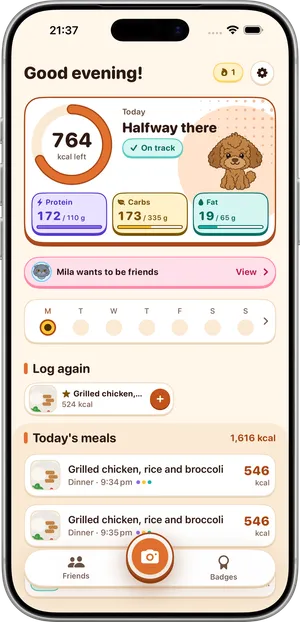
A daily ring shows how the day is going against your calorie target, with targets for protein, carbs and fat beside it.

  • Four numbers, always in the same order: calories, protein, carbs, fat.
  • Targets are yours to change.
  • Swipe back through earlier days on the home screen and add a meal to a past day.
Your daily target in Luca on iPhone: a calorie target with plus and minus buttons, targets for protein, carbs and fat, and the line This is an estimate, not medical adviceLuca's Today screen on iPhone: a ring with calories left and the words Halfway there, boxes for protein, carbs and fat against their targets, a Log again row and today's meals

Streaks and achievements

Small wins, every day

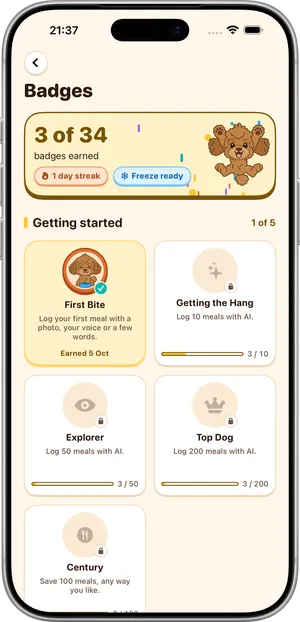
Logging builds a streak and earns badges along the way.

  • One streak freeze a week covers a day you miss.
  • Forgot to log? A meal added for yesterday or the day before still counts toward your streak.
  • Each badge says what it takes: no mystery badges.
Badges in Luca on iPhone: the number of badges earned, the day streak, a Freeze ready chip, and a grid of earned and locked badges

Friends and challenges

Someone to share them with

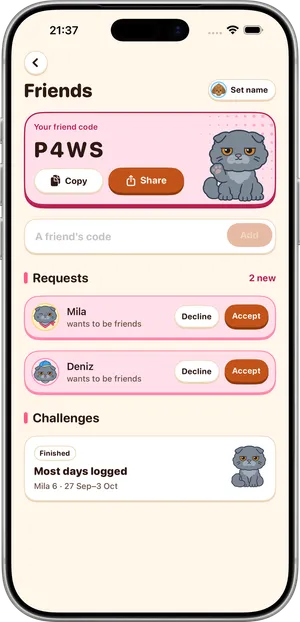
Add a friend with a 4-character code and set up a challenge between you. Mino, Luca's cat friend, looks after this side of the app.

  • Three kinds of challenge: longest streak, most days logged, most goal days.
  • Friends see your name, avatar, streak, whether you logged today, whether you reached your goal today, and your badges.
  • Friends never see calories, macros, meals or photos.
  • Twelve avatars to choose from: six of Luca, six of Mino.
  • No phone number, contact list or email is used to find friends.
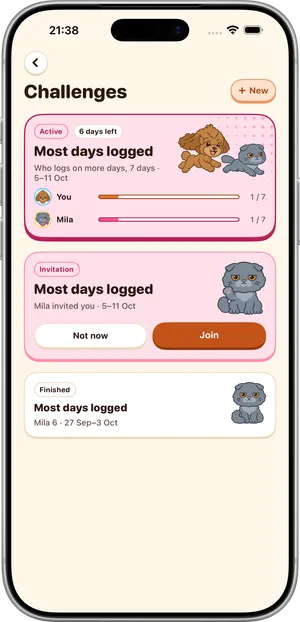
Friends in Luca on iPhone: a 4-character friend code with Copy and Share beside Mino the grey cat, and friend requests with Accept and DeclineChallenges in Luca on iPhone: an active Most days logged challenge with a bar for each person, an invitation with a Join button, and a finished challenge

Widgets

On your Home Screen and Lock Screen

Home Screen widgets and Lock Screen widgets show today without opening the app.

  • A glance is often all you need.
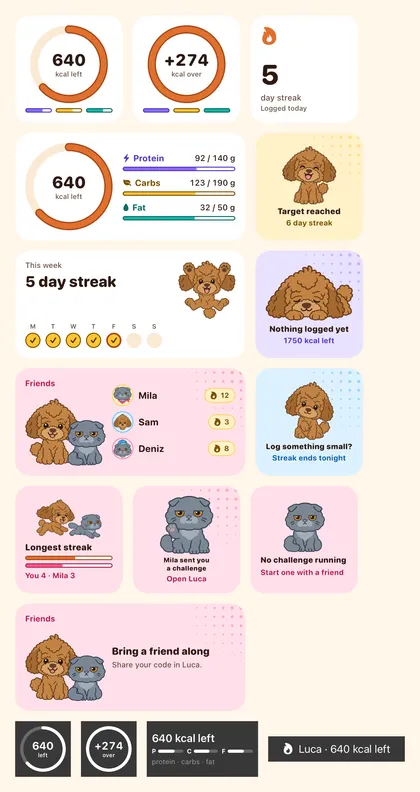
Luca's widgets: calories left as a ring, a day streak, macro bars, a streak week, Luca mood widgets, friends and challenge widgets with Mino the cat, and four Lock Screen widgets

Apple Health and reminders

Fits in with your iPhone

Luca works with Apple Health if you turn it on. It is optional, and you decide in iOS what is shared. Reminders arrive at a time you choose.

  • Apple Health data stays in the Health store on your device.
  • Reminders can be changed or turned off at any time.

The four numbers

Every meal and every day is shown as these four. Where a food is recognised, they are calculated from a nutrition database of more than 10,000 foods.

  • CaloriesThe energy in the meal, in kcal.
  • ProteinGrams, counted toward your protein target.
  • CarbsGrams of carbohydrate.
  • FatGrams of fat.

What Luca does not do

Better to know before you start.

It does not weigh your food

Photo, voice and text results are estimates and they are approximate. Why, and what to do about it

It does not give advice

Luca is not a medical device, a dietitian or a weight-loss program, and it promises no outcome.

It is iPhone only

iOS 17 or later. There is no Android, iPad, web or Apple Watch app.

Free to start, no account

See what is free and what Pro adds, or read how a scan works.

Coming to the App Store