 Luca
LucaAI calorie tracker for iPhone
Snap it. Luca counts.
Take a photo of your meal. In seconds Luca gives you an estimate of calories, protein, carbs and fat, with a list of what it saw. Change anything, then log it.
For iPhone, iOS 17 or later. Questions? support@ege.md
Photo results are estimates, and they are approximate. Luca says so on every result and lets you adjust every item and number. What "approximate" means

Every meal, four numbers
What you get from one photo
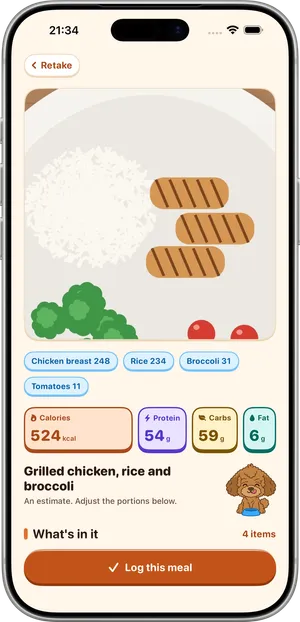
An item list, and for the whole meal these four. Luca's AI works out what the food is and how much; where the food is recognised, the numbers are calculated from a nutrition database.
- CaloriesThe energy in the meal, in kcal.
- ProteinGrams, counted toward your protein target.
- CarbsGrams of carbohydrate.
- FatGrams of fat.
How it works
Three steps, a few seconds
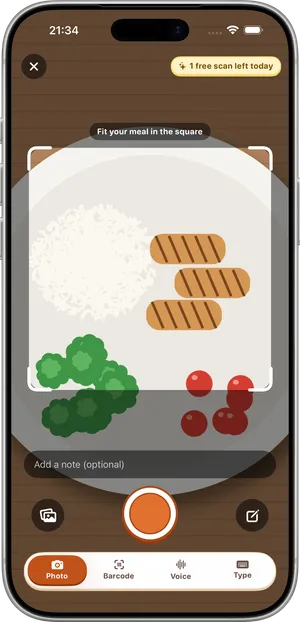
Snap
Fit the meal inside the square frame and take the photo.
Check
Luca lists the foods it saw with an estimate for each. Fix a portion, remove an item, or type a sentence such as "the rice was brown" and Luca updates it.
Log
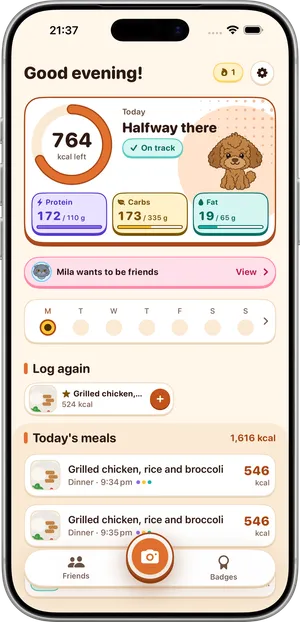
One tap and the meal joins your day. The ring and your macro targets update.
An estimate, said plainly. A photo cannot show the butter in the pan or how full the bowl is, so a photo result is a starting point, not a final number. Adjust it when you know better. How the scan works and how to get closer estimates
No photo? No problem
Four more ways to log
Say it
Describe the meal out loud, in up to 20 seconds, the way you would tell a friend.
Type it
A short description is enough to get an estimate you can edit.
Scan the barcode
Packaged food comes with the numbers from its label. Not in the database? Luca can read the nutrition label.
Tap a favorite
Recent and favorite meals are one tap away, for the breakfast you have every day.
Streaks, badges and friends
Keep going, with company
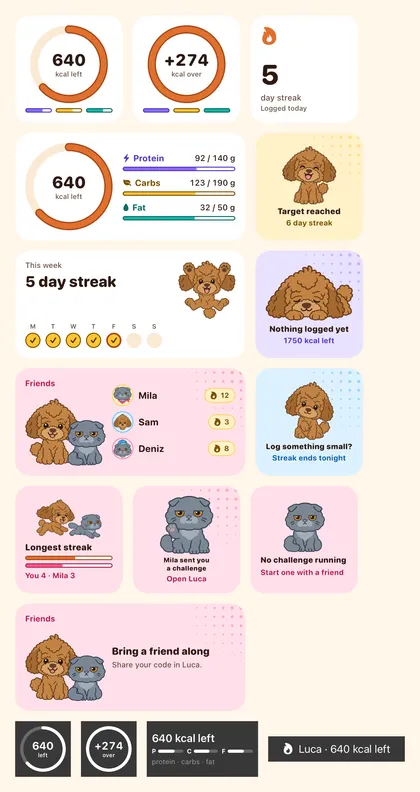
Log a day and your streak grows, with one freeze a week for the day you miss. Earn badges along the way. Add a friend with a 4-character code and start a challenge together. Mino the cat looks after that side of things.
Friends see
- Your name and avatar
- Your streak
- Whether you logged today
- Whether you reached your goal today
- Your badges
Friends never see
- Your calories or macros
- Your meals
- Your photos

At home on iPhone
There when you glance at your phone
Widgets
Home Screen widgets and Lock Screen widgets keep today in view without opening the app.
Apple Health
Luca works with Apple Health if you want it to. It is optional and off until you turn it on.
Reminders
A nudge at the time you pick, so logging does not depend on remembering.
Private by design
What you eat is your business
Meals are stored on your iPhone, and in your own iCloud if you use it. See exactly what leaves the phone
No account
No sign-up, no email, no password. An anonymous identifier is all the app uses.
Photos are not kept
A photo is sent to be analysed and is not stored on the server. The same goes for a voice recording.
Our own servers
Processing runs on servers the developer operates, not at a third-party AI provider.
Friends see streaks, not meals
Never your calories, your macros, your meals or your photos.
Pricing
Free to use, Pro for unlimited scans
The free plan has 1 AI scan a day. Barcode and manual entry are always unlimited. Full pricing
Free
$0
No account, no card.
- 1 AI scan a day: one estimate from a photo, a spoken or a typed description
- Barcode scanning and label reading, unlimited
- Manual entry, unlimited
- Fix with words: up to 5 fixes per meal, no scan used
- Recent and favorite meals
- Daily ring and macro targets
- Streaks, achievements, friends and challenges
- Widgets and Lock Screen widgets
- Apple Health (optional) and reminders
Luca Pro Unlimited scans
- $6.99a week
- $9.99a month
- $49.99a year
- Unlimited AI scans (fair-use limits apply)
- Everything in Free
US prices; prices vary by region. An auto-renewing subscription billed through Apple. Cancel anytime in Settings.
Find your way in
What people use Luca for
Calories without typing
Take a photo of your meal and get an editable estimate of calories and macros in seconds. For people who gave up on logging because of the typing.
Read moreTracking protein
See an estimate of the protein in each meal and how the day adds up against your protein target, from a photo, your voice, text or a barcode.
Read morePackaged food by barcode
Scan the barcode on packaged food and log its label nutrition in seconds. Unlimited on Luca's free plan, with label reading as a fallback.
Read moreEating out
Restaurant meals rarely come with a label. Photograph the plate for a quick estimate of calories and macros, then adjust for what you can't see.
Read moreLogging with a friend
Add a friend by a 4-character code, share streaks and challenges, and keep meals private. Friends see streaks and badges, never calories or photos.
Read moreMacros for beginners
New to macros? Luca shows calories, protein, carbs and fat for every meal from a photo, so you can learn what is on your plate before chasing numbers.
Read moreQuestions
Frequently asked questions
What is Luca?
Luca is an AI calorie tracker for iPhone with a poodle mascot. You photograph a meal and Luca returns an estimate of calories, protein, carbs and fat with an item list you can edit. You can also log by voice, by typing or by barcode. It needs no account.
How does Luca count calories from a photo?
You take a photo of the meal inside a square frame. The photo is sent to servers the developer operates. Luca's AI works out what the food is and how much, and calories, protein, carbs and fat are calculated from a nutrition database where the food is recognised. It takes seconds. You check the item list, change anything that is off, and log it. One such estimate, from a photo, a spoken or a typed description, is a scan.
How close are the photo estimates?
They are approximate. A photo cannot show the oil in a pan, the sugar in a sauce or how full a bowl is, so treat every photo result as a starting point and adjust it. Luca labels photo results as estimates, every item and number can be edited, and Fix with words lets you correct a result by typing a sentence. We do not publish an accuracy figure.
Do I need an account to use Luca?
No. There is no sign-up, no email and no password. The app uses an anonymous identifier so the servers can tell one installation from another.
Is Luca free?
There is a free plan with 1 AI scan a day and unlimited barcode scanning and manual entry. Luca Pro has unlimited AI scans (fair-use limits apply) and costs $6.99 a week, $9.99 a month or $49.99 a year in the US, billed through Apple. You can cancel anytime in Settings.
What happens to my meal photos?
A photo is sent over an encrypted connection to be analysed and is not stored on the server. Processing runs on servers the developer operates, not at a third-party AI provider. Your meals are stored on your iPhone, and in your own iCloud if you use it.
What can my friends see in Luca?
Only your display name, your avatar, your streak, whether you logged today, whether you reached your goal today, and your badges. Friends never see your calories, your macros, your meals or your photos.
When and where can I get Luca?
Luca is coming to the App Store for iPhone with iOS 17 or later. It is not released yet, so there is no download link on this site today.
Is Luca a medical or weight-loss app?
No. Luca is a food log that gives estimates for general information. It is not a medical device, it does not diagnose or treat anything, and it makes no promise about weight or health. For advice about your own diet, talk to a qualified professional.

Luca is on his way
For iPhone, with a free plan and no account.